Practical guide
Mastering the application lifecycle: the keys to a successful upgrade without service interruption (the case of a Gravitee platform installed with RPM packages)
Prepare, upgrade component by component, test and keep a verifiable rollback: the method for upgrading a Gravitee platform installed with RPM packages.
3 min readAmine HOUMAM
- Gravitee APIM
- Gravitee AM
- API Management
- Mise en production
Upgrading a Gravitee platform brings fixes, security and functional improvements. When installed with RPM packages, it must preserve API availability, configuration and authentication journeys. The method relies on preparation, a gradual upgrade, testing and a verifiable rollback.
1. Scope and references
The scope covers APIM (Management API, Console, Portal and Gateway), Access Management, MongoDB, Elasticsearch, the reverse proxy, TLS certificates, DNS, the load balancer and systemd services. Validation goes through Dev, Acceptance, then Production.
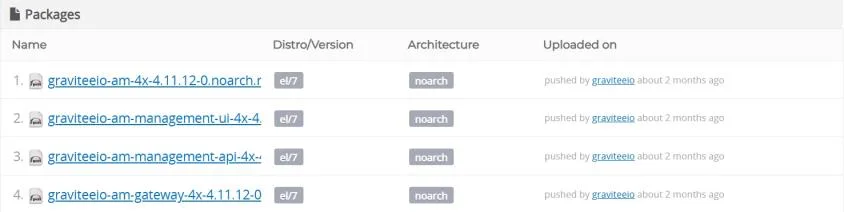
Figure 1 — Access Management 4.11.12 RPM packages. The AM packages are separate: Management UI, Management API and Gateway. Check each version.
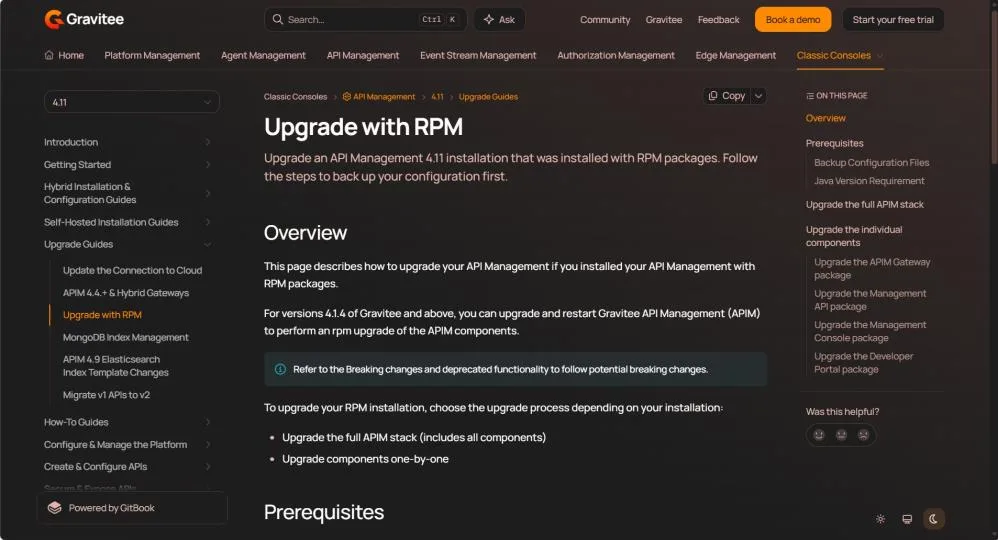
Figure 2 — Official “Upgrade with RPM” reference: APIM 4.11 documentation.

Figure 3 — APIM 4.9.12 RPM packages: REST API, Portal UI, Management UI and Gateway.
2. Mandatory preparation
- Confirm source/target versions, Java prerequisites, breaking changes, plugins and policies.
- Inventory services, ports,
gravitee.ymlfiles, certificates, secrets, DNS and health checks. - Back up the APIM/AM MongoDB databases; test the restore before Production.
- Copy configurations, certificates, keystores/truststores; export the RPM and plugin versions.
- Check Elasticsearch and take a snapshot if analytics must be kept.
A backup that has not been restored in a validation environment is not a reliable rollback.
3. A controlled upgrade
Going component by component limits risk and makes diagnosis easier. Do not restart the whole platform at the same time.
- Management API: upgrade, restart, wait for the migrations to finish and check the logs.
- Management Console: upgrade, then validate administrator access, APIs, plans and applications.
- Developer Portal: upgrade, then check the catalogue, documentation and consumer access.
- Gateway(s): upgrade gradually; take an instance out of the load balancer, test it, then put it back in the pool. With a single Gateway, the restart can cause an interruption: plan a maintenance window or standby capacity.
Indicative RPM commands
rpm -qa | grep -i gravitee
sudo yum check-update
sudo yum upgrade <paquet-gravitee>
sudo systemctl restart <service-gravitee>
sudo systemctl status <service-gravitee>
journalctl -u <service-gravitee> -f
N.B.: the two versions APIM 4.9.12 and AM 4.11.12 are compatible.
4. Validation by environment
In Dev, then in Acceptance: apply the sequence, compare configurations and test before any Production run. In Production, handle the Gateways one by one and monitor logs, errors, availability and latency.
APIM checks
- Health checks, DNS and TLS certificate.
- Reference API call; valid/invalid API Key; JWT/OAuth2 (valid, expired, insufficient scope).
- CORS, rate limiting, quotas and critical policies.
- Console, Portal, Management API and analytics.
AM checks
- Login/logout, OAuth2/OIDC, callbacks, token and userinfo depending on usage.
- SMTP, certificates, sessions and expiry.
- Initial TOTP enrolment and TOTP challenge on a new session.
- Domains, clients, users and roles.
MongoDB and Elasticsearch
After the migration, check MongoDB through APIs, applications, subscriptions and AM data. For Elasticsearch: cluster health, traffic indices, ingestion of a test call, no critical errors and normal indexing delay.
5. Rollback and checklist
An RPM downgrade alone is not enough if MongoDB has been migrated. If something fails: stop the rollout, isolate the Gateway concerned, restore the pre-upgrade MongoDB, restore configurations/certificates, reinstall the previous RPMs, restart the services, then run the tests again.
- ☐ Versions, prerequisites and breaking changes validated
- ☐ MongoDB and configuration backups available and restore tested
- ☐ Dev and Acceptance validated
- ☐ APIM, AM, OAuth2/OIDC, MFA and analytics tested
- ☐ Gateways renewed gradually
- ☐ Rollback criteria and completion communication approved
Conclusion
A successful Gravitee upgrade with RPM packages depends on a controlled order — Management API, Console, Portal, then Gateways —, restorable backups, gradual validations and complete APIM/AM testing. This approach reduces risk and keeps the operation reversible.
References
- APIM Upgrade with RPM: documentation.gravitee.io/apim/4.11/upgrade-guides/upgrade-with-rpm
- Access Management guides: documentation.gravitee.io/am/getting-started/install-and-upgrade-guides
- Gravitee RPM repository: packagecloud.io/app/graviteeio/rpms