SaaS
Infor M3 ERP and data integration with Boomi: what's in it for your business?
ERP overhaul at a food manufacturer: Infor M3 connected to legacy systems via Boomi, EDI order and invoice flows, production scales and BI.
6 min read
- Infor M3
- Boomi
- ERP
- EDI

Deciding to overhaul all or part of your information system is a challenge for any company: as the saying goes, “you know where you’re starting from, but not quite where you’ll end up”. That is why CIOs who embark on this journey study the existing problems and call on IT professionals to support them throughout the process.
This was the case for our client, a French food company specialising in frozen products, which we supported in restructuring its information system. Our teams helped this client define its integration strategy, choose its solutions and implement the project. It was a strategic issue for the company, which we approached in a methodical and proactive way.
This article describes the data flow architecture put in place to connect the Infor M3 ERP to the legacy systems through the Boomi iPaaS.
Obsolete ERP project: stakes and action plan
The main reasons for changing ERP
As its business grew, our client had recently noticed its processes running more slowly, and wanted to strengthen the security and reliability of its ERP, which must constantly adapt to the latest security standards.
The vendor of the old ERP chose to push its new cloud version, reducing the level of support for the on-premise version. This creates several problems, such as:
- Lower performance
- ERP obsolescence
- No support or maintenance.
- Limited compatibility that cannot evolve: an obsolete version is not compatible with new technologies and new software versions, which can make it hard to integrate new tools that meet new business needs, or to update existing processes.
- A lack of scalability
- Security gaps: an obsolete ERP may not comply with the latest security standards, which can increase the risk of data breaches or cyberattacks.
To guard against these problems, our client launched a project to overhaul its ERP, together with an optimisation of all the data flows around it.
Booming activity held back by a lack of scalability
Growth brings new needs; in our client’s case, these centred on handling volumes, setting up BI to support logistics and order forecasting, and so on. On top of that came technical needs related to improving response times and the type of installation (on-premise).
Our client’s CIO and business management therefore had to take on the challenge of evolving their information system so that it could keep up with their new needs. This ultimately led to the decision to replace their ERP with Infor M3, a good compromise because it can meet the company’s changing needs and adapt easily to future developments.
INFOR M3, the best choice?
It was in this context, and to address these problems, that our client chose the Infor M3 ERP, designed to meet the management needs of the whole company, including supply chain management, financial management, production management and human resources management. The solution offers a multi-company, multinational platform that can be deployed on-premise or in the cloud, and it is suited to companies of all sizes and in all sectors.
In addition, the ERP has features that allow companies to adapt quickly to changes in their environment, in terms of trends, business models and business growth.
What the INFOR M3 solution brings, combined with successful integration expertise from We Are Beebay x BOOMI
We Are Beebay defines the integration strategy for the chosen new ERP (INFOR M3) and its interfaces with existing applications
By choosing Infor M3, our client also had to rethink its integration strategy, opting for the leader in intelligent connectivity and automation: Boomi, the pioneering iPaaS vendor.
To do this, we first helped our client connect Infor M3 to the existing systems: communicating and interfacing with the VAN (Value-Added Network / various trading partners for the EDI flows ORDER (orders), INVOICE (invoices), DESADV (despatch advice) and INVRPT (inventory report)).
We also created new flows to improve productivity (automated integration of production order management, interfacing M3 with the scales) and to get a more complete view of the data by setting up a BI flow, which improves decision-making and the company’s efficiency.
Choosing the Boomi iPaaS
Boomi natively offers a large number of connectors that make it much easier to build interfaces between applications. For example, integrating customer orders received in different formats, such as EDI, CSV, fixed format, Excel or PDF.
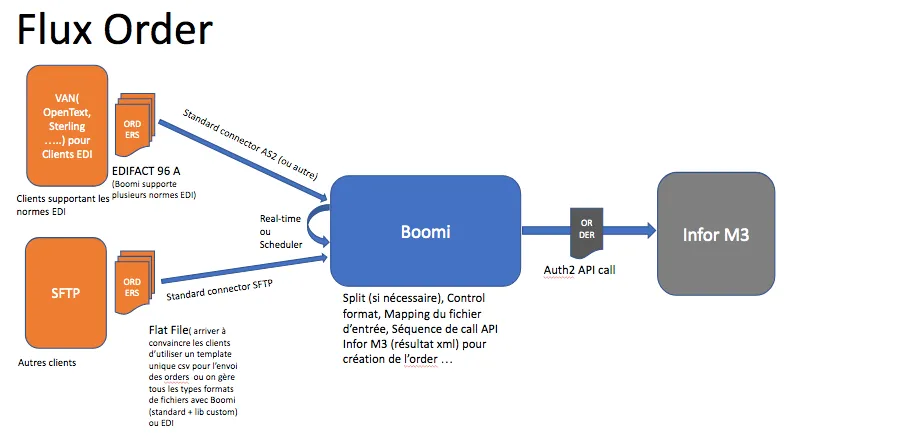
Boomi can process data in real time (real-time event-driven execution) or schedule processes (Scheduler). The platform natively handles different file types (various EDI standards such as EDIFACT 96A, or flat files) and makes it possible to import custom libraries to process other types (Excel, PDF). It can also split files, check their format and transform them (mapping) (e.g. from an EDI file to an XML file). Most importantly, Boomi can easily make REST API calls to Infor M3 while handling OAuth2 authentication (including token refresh), which allows order data to be integrated. A similar use case applies to INVRPT (inventory report).
Example of a pattern put in place
Use case 1: integrating order data
Use case 2: sending the invoices generated by Infor M3
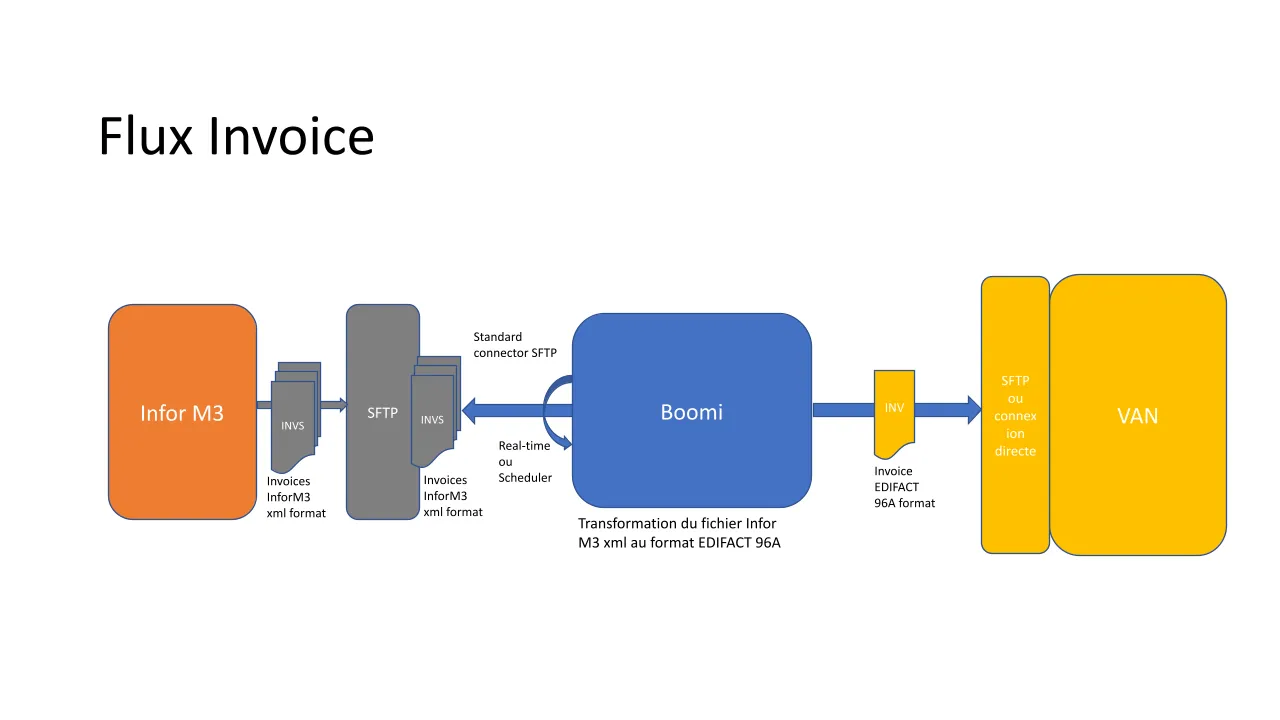
To send the invoices generated in XML by Infor M3 to the customer via the VAN in EDI format, Boomi picks up the invoices from the dedicated SFTP folder and transforms them into the right EDI format, in line with the end customer’s requirements and specifications (specifications differ from one customer to another). A similar use case applies to DESADV (despatch advice).
Use case 3: automating part of the production chain: scales interface (managing inbound and outbound production order data, item recipes, etc.)
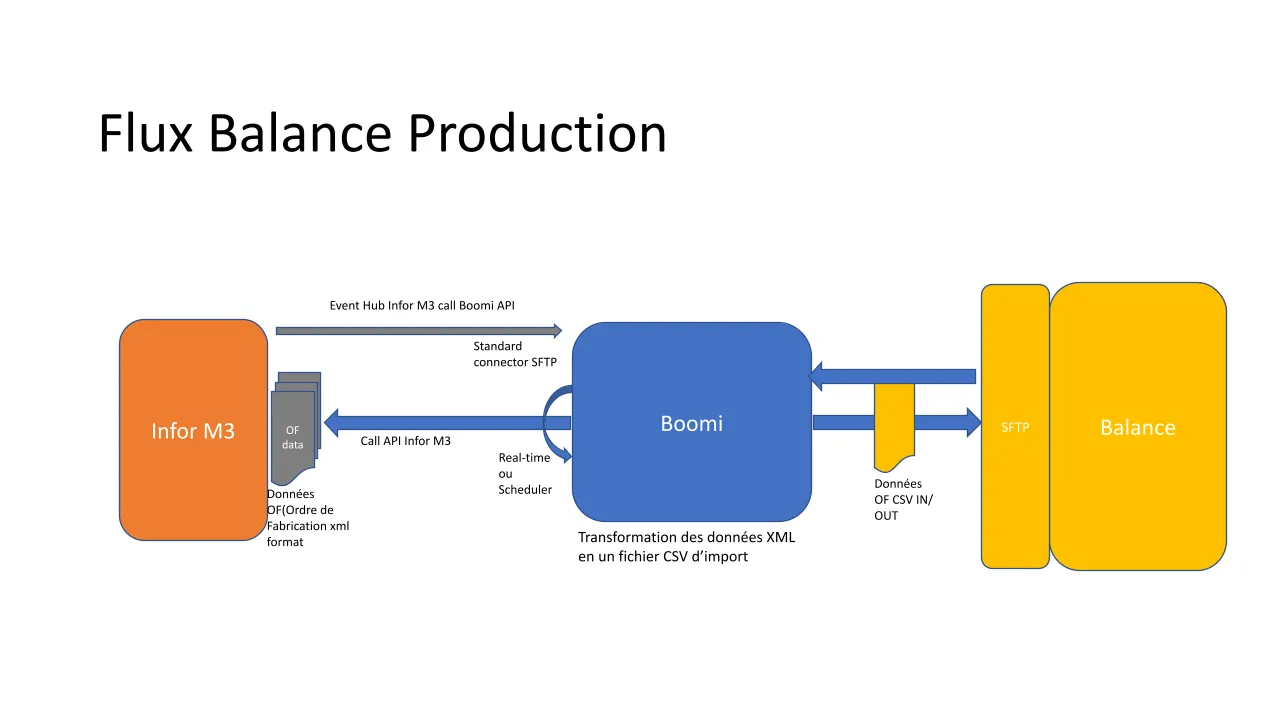
Before automation, exchanges between the old ERP and the scales were handled by exporting and printing every day the production orders that the production workshops using the scales had to process during the day. In the other direction, at the end of each day, the data from the scales was entered manually into the old ERP to record the day’s work. The data held in the scales was also programmed manually.
This flow connects Infor M3 and the scales via Boomi, and so removes all manual intervention (risk of error, better productivity).
Boomi is the right choice for this type of flow because it natively handles XML and CSV formats (reading, transformations, etc.).
Use case 4: combining and using Infor M3 data for BI
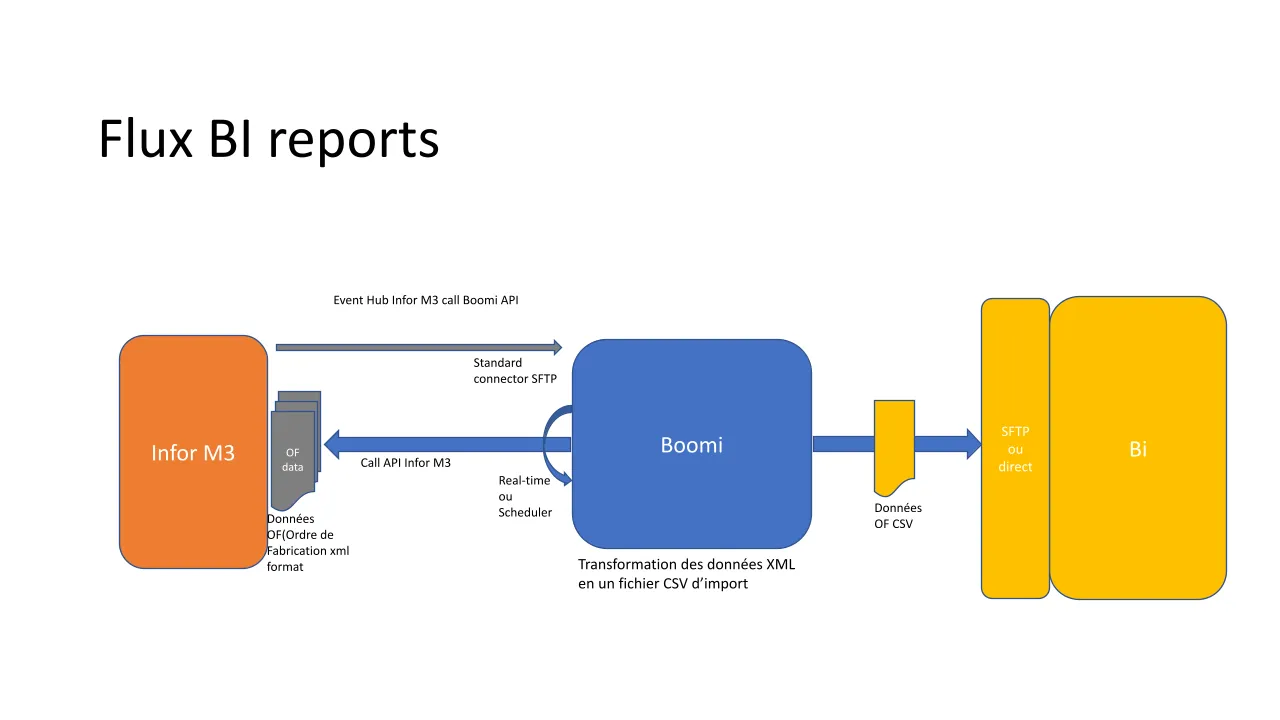
Sharing Infor M3 data with BI tools makes it possible to visualise it clearly and intuitively, relate it to other data sources, and create custom dashboards and reports to track the company’s performance and identify opportunities for improvement.
Support from We Are Beebay, and the story of a company that dared to change
The key takeaway is that an ERP is first and foremost a solution that makes operations, performance and customer and employee satisfaction easier. However, putting one in place often comes with major changes to a company’s information system.
An information system overhaul skilfully led by our team of expert consultants, marking a new business turning point for our client. Something to inspire you for modernising your own information system!