Use case
Migrating object storage: what copying the files does not reveal
Migrating a DAM's storage to Azure Blob Storage: 18 reference gaps detected, a 30-minute cutover and three business journeys validated after go-live.
4 min readYasser LAKRAIMI
- Migration
- Azure
- DAM
- Cloud
A migration can copy every file and still bring catalogue production to a halt. We Are Beebay supported one of its clients in migrating the object storage of its Digital Asset Management (DAM) application to Azure Blob Storage. This DAM centralises, organises and makes available the images and documents needed by the applications and for catalogue production.
A storage change that affected the whole catalogue chain
The client already relied on Azure for part of its information system. Maintaining a separate S3-compatible storage required additional operating and access management practices. Choosing Azure Blob Storage was therefore a matter of rationalisation, at the cost of an interface change. To limit this dependency in the DAM, the team opted for an application abstraction layer.
At first, the migration seemed to come down to three operations: inventory, copy, change the configuration. The audit showed that an object present in Azure does not automatically become usable by the applications.
Across more than 6,000 images and 800 Excel files, reconciling application paths with stored objects revealed 18 reference gaps. Detected during the audit, they were not losses caused by the transfer. The team analysed and fixed them before the cutover.
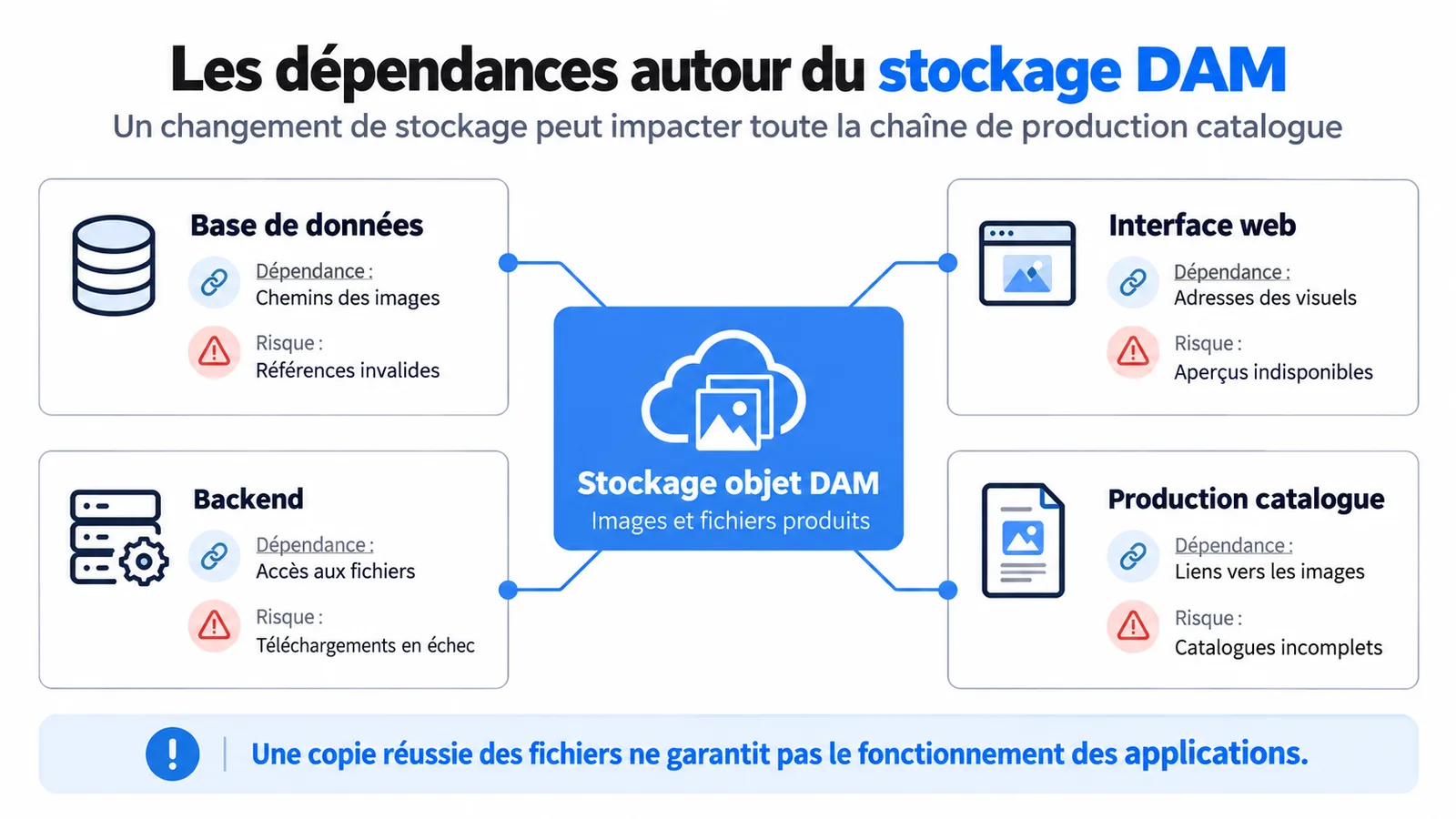
The dependencies involved four components: the SQL database held image paths, the interface built the URLs, the backend managed access and downloads, and the exports passed links to the catalogue tool. Copying the files without adapting these uses could have left previews unavailable or catalogues incomplete.
Three architecture choices and their trade-offs
1. Keep the business code portable
The S3 API is a de facto standard for object storage, but Azure Blob Storage does not expose it natively. [1] The team isolated reading, writing and deleting behind a common interface, with one implementation per provider. This choice limits changes to the business code and makes a future exit from Azure easier; it does not automatically make URLs, permissions or external integrations portable.
2. Separate the product reference from the file address
The DAM uses stable logical keys for images, for example produits/1234/visuel.jpg, rather than a provider’s URL. But the links in an Excel export may be opened several hours or days after it was generated. Access to the images must therefore be rebuilt for the export: a stable key does not repair an old, frozen link.
3. Secure private images without blocking catalogues
For the catalogue tools, the DAM produces temporary SAS links when preparing the export: their scope and validity are matched to the permissions and to the time needed for layout. The Azure container stays private, with no anonymous access; however, a valid SAS link can be used by anyone who holds it, within the limits granted. The distribution of Excel files containing these links must therefore stay under control. A new export can renew the URLs without changing the business references. [2]
Four steps, two proofs of success
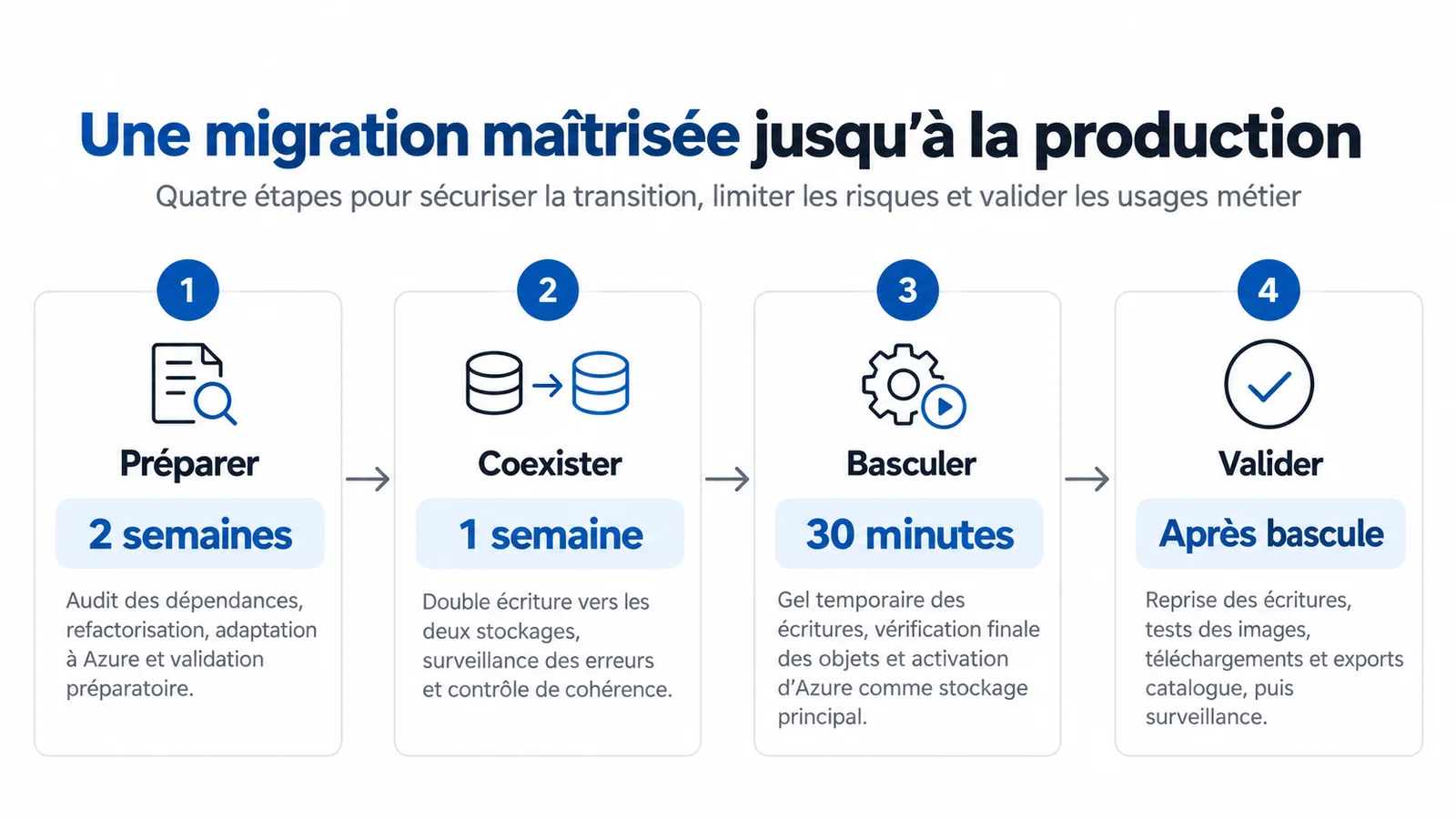
After the audit and the first application changes, the team ran a non-destructive initial copy of the history with rclone copy. During the week of coexistence, new files were written to both storages. This dual writing does not remove the need to check changes, deletions and any failures on one side: a final comparison comes before the cutover. rclone sync can delete objects, hence the value of a --dry-run. Finally, two validations complement each other: rclone check for object consistency, then tests of the DAM and catalogue business journeys. [3]
After the cutover: the results that matter
The work took two weeks of audit, refactoring, adaptation and validation, followed by one week of dual writing. In a 30-minute cutover window, the team suspended new writes, compared the data between the two storages and activated Azure Blob Storage as the main storage. Writes then resumed on Azure.
After the cutover, tests confirmed that the three critical journeys worked: displaying images, downloads and exports for catalogue production. The resolution of the 18 reference gaps had also been checked before go-live.
The rollback plan made any return conditional on reconciling the new writes made on Azure: simply reactivating the old storage could have left out images added since the cutover. Rolling back remained possible, but required this extra check.
Key takeaways before your next migration
Three lessons stand out from the project: map the consumers before the objects, decouple business references from the provider’s URLs, and measure success on application journeys, not on the transfer alone.
For your next migration, five questions help scope the risk: which objects are used? Where are the links stored? Who can access them, and for how long? How will you handle the last writes and the rollback? How much will coexistence cost?
The financial lock-in is changing; the technical lock-in remains. For the services concerned in the European Union, the Data Act provides for the removal of specific switching charges from 12 January 2027. Application changes and business testing are still needed; separate rules apply to certain cases of simultaneous use of services. [4]
One action this week: search for bucket names, domains and storage paths in the code, the SQL database, scripts and exports. How widely they are scattered often reveals more risk than the volume to copy.
Let’s map your dependencies before the cutover. We Are Beebay supports the audit, architecture decisions, controlled transfer and validation of business uses. Let’s talk about your migration.