Blog
Connecting Workday to legacy systems: a strategic lever for your business
Connecting Workday to Saviynt, Workhuman and SAP Concur with Boomi: three HR use cases for a global leader in pharmaceutical distribution.
7 min read
- Workday
- Boomi
- SIRH
- Legacy
From recruitment to employee onboarding, through planning, compliance and benefits management, HR systems have to be set up as precisely as a fine watch.
Yet one problem keeps coming back: how do you efficiently manage the many data sources needed to respond to employee requests, whether about career tracking, professional development, holiday balances, benefits, access badges or expense reimbursement?
In this article, we look at the experience of one of our clients, a leader in pharmaceutical distribution, which made the strategic decision to adopt Workday to manage its HR data. To make its processes more efficient, this global group chose the Boomi iPaaS to connect Workday to all of its legacy applications. We take a close look at this approach, which aims to simplify and streamline HR operations, starting with connectivity between the existing ERP and Workday, then extending it to the company’s entire legacy landscape.
If, like our client, you are wondering how to connect your Workday application to the rest of your company’s legacy systems, this article is for you! But first, let’s take a closer look at what Workday is, what BOOMI is, and which applications make up the rest of the legacy landscape.
Workday: the central repository for employee information
What is Workday?
Workday is human resources and financial management software sold as SaaS (software as a service). It is a fully online, cloud-based solution that provides all the features our client needs for its HR management tasks.
The Workday software is so successful and used by so many organisations because it offers many advantages: it can be activated and rolled out quickly, and it removes the workload of managing the IT infrastructure needed to run it. On top of that, its HTML5 web interface offers full transparency and accessibility, at any time and from any device (PC, tablet, Android and iOS smartphones).
Workday is the application our client uses in this use case to manage and organise company and human capital data. As we saw in our first article, we first helped our client connect Workday to its Oracle ERP through the Boomi iPaaS. Let’s now turn to connecting Workday to the rest of the company’s applications.
How and why connect Workday to the rest of the company’s legacy systems for effective HR data management?
Connecting Workday to the company’s other “legacy” systems is essential to integrate processes and data smoothly. Here are the key reasons for this integration:
- Process integration: by connecting Workday to the rest of the company’s applications, HR processes can be integrated with other business processes. This supports smooth collaboration between the company’s functions, such as finance, operations and logistics. Information and data flows can be shared transparently, so activities are well coordinated.
- Data consistency: the link between Workday and the legacy systems keeps data consistent. Employee information, such as personal data, payroll information and benefits, is synchronised accurately and reliably between the two systems. This avoids double-entry errors and ensures that all stakeholders have access to the same up-to-date information.
- Process optimisation: by connecting Workday to the information system, HR processes and the related business processes can be optimised. For example, workforce management in Workday can be aligned with the company’s resource planning processes, making it easier to anticipate staffing needs and make the best use of available resources. This leads to better use of talent and better strategic decisions.
- Access to key information: the link between Workday and the information system gives stakeholders access to key information in real time. HR managers can get up-to-date data on employee performance, labour costs, workforce analytics and so on. Decision-makers at company level can get an overall view of HR data to make informed decisions.
- Optimal HR management: to achieve this, as with the ERP integration covered in detail in our first article, it is important to choose a suitable tool for this connectivity, such as the Boomi iPaaS, to guarantee the quality and reliability of the data exchanged. In addition, the no-code nature of the iPaaS makes the interfaces much easier to build and maintain.
Boomi: the key solution for connecting Workday to the rest of the information system
What is Boomi?
Boomi is a cloud-based integration platform, also known as an iPaaS, that lets companies easily integrate applications, databases, partners and customers.
Data flows are built in the platform with a visual module using point-and-click and drag-and-drop. Connections and process templates have already been created by the community and are ready to use. Each component of a flow can be reused by other processes.
Once the data flow is built, it is deployed on a Boomi Atom. Atoms are deployed in the cloud or on a local server. They contain the integration processes, which can be run as many times as needed.
The Boomi Atom architecture centralises all integrations in the same platform, wherever they are deployed and however many processes are deployed.
Real-world use cases of successful integration: We Are Beebay × Boomi
Workday can communicate with many applications.
Three of our client’s use cases are presented below, all around synchronising employee information between Workday and other systems.
Access management – badge activation and deactivation
The problem that Saviynt and Boomi solve is the efficient synchronisation of employee identity information, so that the permissions granted by the employer are updated in real time.
In this case, our client was losing a great deal of time collecting information manually from Workday, with a whole HR team needed to re-enter the same data into Saviynt. On top of that, updates had to be made every day, which led to frequent omissions and disrupted employees’ permissions. This had a direct impact on productivity and on day-to-day activities within the company.
This is where we came in to help our client with this problem. We identified the essential need to update all information about newly recruited employees, or status changes for existing employees, consistently across all the relevant systems.
The solution is built around the following process:
- Saviynt acts as the identity and access governance solution, providing a unified view of the company’s identity activities. Its role is to retrieve employee information and check whether each employee exists in its database, using API calls.
- Once the information is updated in Saviynt, it is synchronised with Workday using Boomi.
- We thus create a link between Saviynt and Boomi, which solves the data synchronisation problem and provides each employee with a working badge with up-to-date access.
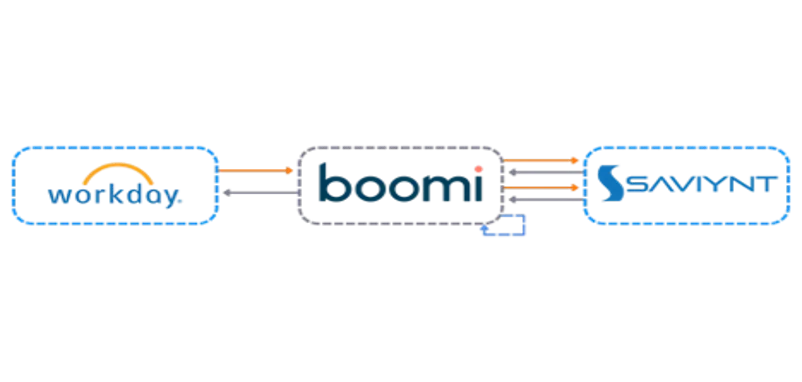
Boomi retrieves from Workday the employee data to be created or updated, checks whether each employee exists in Saviynt through API calls, then updates them.
Managing the internal social network
The problem we solve here is the efficient management of employee information from Workday and its integration with Workhuman via Boomi.
Our client wanted to set up an internal chat system, including each employee’s profile and contact details, to make communication between departments easier. They also wanted an overall view of project progress and to be informed of internal changes in real time.
To meet these requirements, we helped our client connect Workhuman, an application dedicated to social interaction within the company, to Workday using the Boomi iPaaS.
The process consisted of:
- Retrieving data from Workday via Boomi
- Processing and mapping it to the specific requirements of Workhuman
- Encoding the data
- Transferring it in sync to Workhuman, ensuring optimal management of human capital and a consistent social recognition experience.
By successfully connecting the requested applications, we enabled our client to streamline communication between departments, save time and make better use of resources.
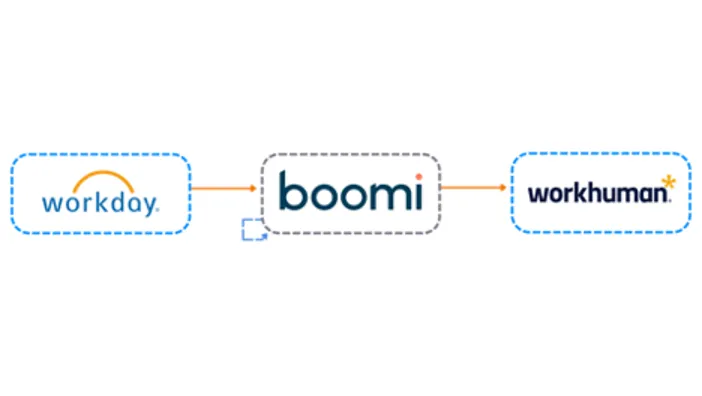
Boomi retrieves data from Workday, transforms it into the right format and sends it to Workhuman as a file dropped on the SFTP server.
Optimising expense reports
The problem that Concur and Boomi address is the efficient management of business travel and expense reports, by integrating employee information from Workday.
When managing a business trip and the related expenses for an employee, for example, it is crucial to have accurate, up-to-date data about that employee, such as personal and bank details. However, this information must be transformed, secured and synchronised with Concur to be managed transparently and efficiently.
Here, the process consisted of:
- Retrieving employee information from Workday through Boomi,
- Transforming this data according to specific needs and encrypting it
- Sending the data to the SFTP server dedicated to Concur for proper synchronisation.
- For on-the-fly data updates, API calls are used.
Concur and Boomi thus make travel and expense management more efficient by integrating employee information accurately between Workday and Concur, which fully addresses our client’s original problem.
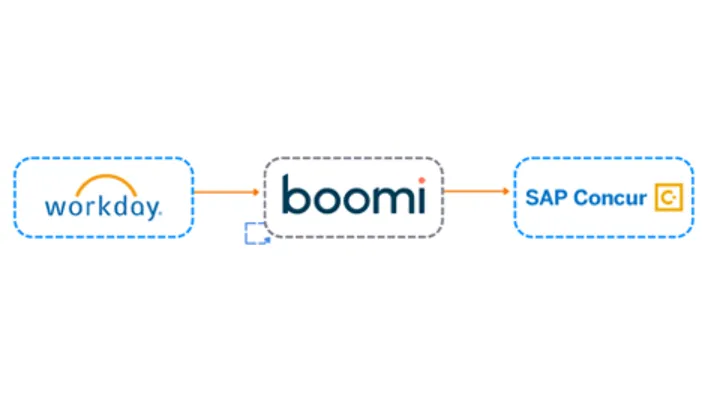
Boomi retrieves data from Workday, transforms it into the right format, encrypts it with a “PGP Key” and sends it to Concur as a file dropped on the SFTP server.
To conclude, the three use cases above show that an application integration project is central to how a company is organised. The more connected your applications are, the further you raise your company’s productivity and efficiency.