Blog
HR in the digital era – Why integrate your ERPs with Workday
Synchronising Workday and Oracle MDM with Boomi: a look back at integrating HR data for a European leader in travel services distribution.
6 min read
- Workday
- Boomi
- Oracle
- MDM
- SIRH
HR is one of the most important departments in any company, as it is responsible for training, recruitment, onboarding new employees, payroll, leave and more. Until recently, the vast majority of HR tasks were carried out manually, but integrating HR applications has now simplified and organised the work of human resources. In this article we will dig into connecting ERPs and Workday through iPaaS, focusing specifically on the case of our client: a European leader in the distribution and sale of travel services, which understood that connecting its applications to its ERP is undoubtedly the way to stay competitive and offer a solution that can grow with the company and its employees. Our client chose us and trusted us to support it throughout the evolution of its information system. Let’s dive in: what are the benefits of this connectivity? And why is iPaaS (integration platform as a service) a key success factor for this project?
Workday: its benefits and its integration with ERPs
What is Workday?
Workday is human resources and financial management software sold as SaaS (software as a service). It is a fully online, cloud-based solution that offers all the features our client needs for its HR management tasks.
If Workday is so successful and used by so many organisations, it is because it offers many benefits: it can be activated and deployed quickly, and at the same time removes the workload of managing the IT infrastructure needed to run it. On top of that, its HTML5 web interface offers full transparency and accessibility, at any time and from any device (PC, tablet, Android and iOS smartphones).
Workday is the application our client uses in this use case to manage and organise company data and its human capital. Let’s now look at the reasons for the integration.
Why is connecting Workday with ERPs (Oracle, SAP, Salesforce) crucial for effective HR data management?
Integrating Workday with a company’s ERPs is crucial for effective and efficient management of company data. This integration makes it possible to share data between the company’s various systems while guaranteeing its quality. It also helps improve productivity by automating processes, reducing costs and lead times by avoiding redundant data entry, and making coordination between the company’s departments easier.
In addition, integrating Workday with ERPs supports better decision-making by providing real-time information and using consolidated data. It also helps meet compliance and regulatory requirements by guaranteeing data security and complying with industry standards.
Among the most widely used ERPs on the market are SAP, Salesforce and Oracle. There are different types of integration between Workday and these ERPs. In this article we will focus on the following use case: synchronising employee management data — employee information such as basic details, payroll information and career information — between Workday and MDM (Master Data Management, an ERP provided by Oracle).
To do this, it is important to choose a suitable tool for the integration, such as Boomi’s iPaaS, in order to guarantee the quality and reliability of the data exchanged. Added to this is the no-code aspect of iPaaS, which makes implementing and maintaining the interfaces much easier.
Boomi: the key solution for effective connectivity between Workday and MDM
What is Boomi?
Boomi is a cloud-based integration platform, also known as iPaaS, that allows companies to easily integrate applications, databases, partners and customers.
Data flows are built on the platform using a visual module based on point-and-click and drag-and-drop. Connections and process templates have already been created by the community and are ready to use. Each component of a flow can be reused by other processes.
Once the data flow is built, it is deployed on a Boomi Atom. Atoms are deployed in the cloud or on a local server. They contain the various integration processes, which can be run as many times as needed.
The Boomi Atom architecture makes it possible to centralise all integrations on the same platform, wherever they are deployed and however many processes are deployed.
A successful integration and support with We Are Beebay
Now that we have covered integrating Workday with MDM and integration using Boomi, let’s look at our use case and the architecture of the flows used. Here, Workday holds the raw employee data entered beforehand by HR, which is processed by Boomi and finally sent to the ERP to update statuses and grant employees full access.
Retrieving the data and inserting it into the “Landing” tables
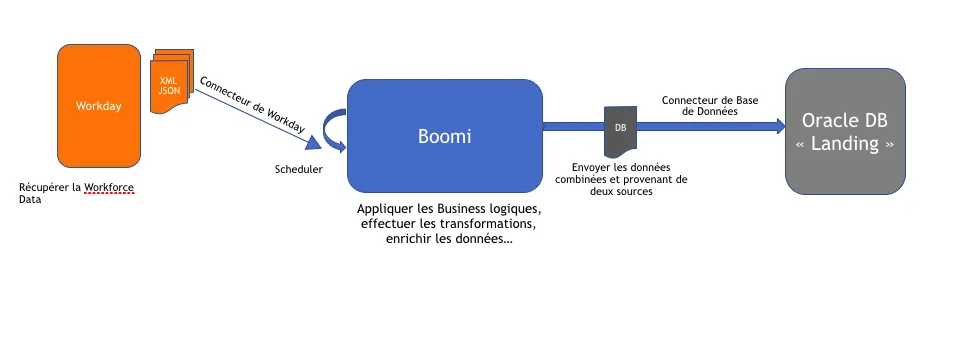
In this first diagram, employee data comes from the Workday application. Connectivity and integration are handled through the iPaaS and our business logic. The aim of this first step is to extract the data (the raw Workday data entered upstream by HR), prepare a payload in Boomi and load it into the “Landing” tables, so that the same data can then be processed for business purposes.
Second flow: sending the data to the “staging” tables and on to Master Data Management
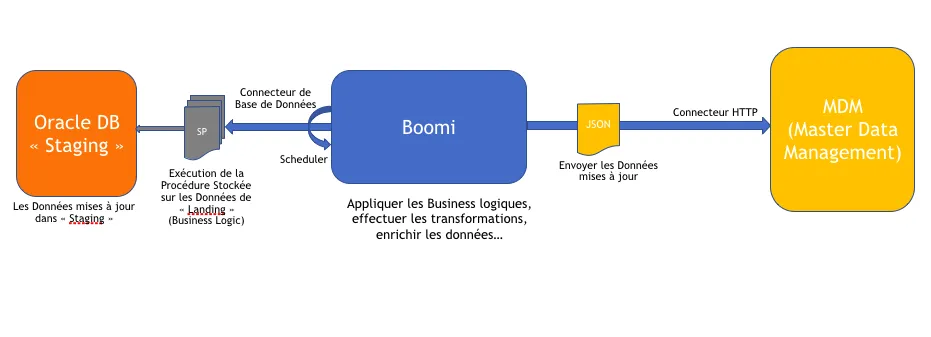
The second step is the most important. Boomi retrieves the Landing data to prepare it for the “staging” tables, applying the functional logic (e.g. updating leave dates and employee statuses: active, inactive, dismissed, retired…), ready to be sent to MDM (Master Data Management, which here centralises workforce data in order to propagate it to the other applications). In practice, this means giving each employee their own access, so they can organise their work, see their status in the company in real time and access all the applications used by the company (in this case Jira, e-learning, Outlook…).
The benefits of choosing Boomi for your integration and We Are Beebay for your support:
As you will have understood, and as our client did too, integrating Workday with ERPs is crucial for effective and efficient management of company data.
From there, Boomi is an ideal tool for this integration because it offers pre-built native connectors for Workday and MDM. This makes connecting the two systems easier and reduces the cost and lead time of setting up the interface.
With Boomi, data can be synchronised in real time or on demand, which makes it possible to track employees’ activity in the company in real time (contact details, training, statuses, career progression…). Boomi also offers customisation options to adapt integrations to each company’s specific needs, enabling tailor-made integrations. This includes support for different file formats, such as XML, JSON, flat files and EDI, as well as the ability to use custom libraries to handle other file types less common in integration (such as Excel or PDF), to map (transform) data, to implement business rules, to check the format of the messages or data exchanged, and to send alerts and notifications when needed.
With Boomi’s data tracking and analysis features (process reporting), companies can monitor the performance of their integrations between Workday and MDM in real time. This makes it possible to identify potential problems quickly and fix errors before they cause more serious damage. Companies can also use the tracking data to optimise the performance of their integrations and improve overall efficiency.
Choosing Boomi for your integration project means ensuring the reliability and scalability of the interface, guaranteeing the quality of the data transferred between systems, and being able to handle the company’s growing needs. This allows our client in this use case, and all the companies that have used it, to focus on their core business knowing that their interface is reliable and can grow with them.
An integration project can certainly prove particularly time-consuming and difficult, especially if your teams are not supported and advised by data integration experts. Key takeaways:
- Integration improves productivity by automating processes, reducing costs and lead times by avoiding redundant data entry, and making coordination between the company’s departments easier.
- Connecting Workday to the ERP makes it possible to synchronise employee management data — employee information such as personal details, payroll information and career information.
- iPaaS is undeniably the tool every company needs for a successful digital transformation.
- End-to-end support from a team of expert consultants is the key to the project’s success.