Business
Integrating Sage X3 with Boomi: the right channel for each flow
Database, web services or SFTP files: four channels to integrate Sage X3 with Boomi, chosen by data freshness, volume and flow direction.
6 min readLahcen Ezzara
- Sage X3
- Boomi
- Salesforce
- SFTP
- API
Sage X3 is the core of the information system: items, prices, stock, orders, invoices — business data is created and managed there. But an ERP only creates value if it exchanges data with the rest of the information system.
So the real question is not whether to connect Sage X3, but how: through its database? Its web services? Files? In batch or in real time? Each flow calls for its own answer.
Across nearly twenty flows built around Sage X3 with the Boomi integration platform — to feed Salesforce and sales applications — four channels stood out. Here they are, illustrated with concrete cases, along with the reasoning used to choose between them.
Connecting an ERP is more than moving data
An ERP does not just store records: it carries transactions, shared master data and business rules. Connecting it to the rest of the information system raises three often underestimated requirements.
The first is freshness: stock availability that is a few hours out of date becomes a promise the company cannot keep — a sales rep committing to a product that has already gone. The second is volume: a catalogue of several hundred thousand items cannot be replayed in full on every cycle without saturating the ERP. The third is reliability.
“A flow that half-fails leaves two systems out of sync — worse than no flow at all.”
Meeting these three requirements with a single channel is wishful thinking. The whole point is to choose, for each flow, the right way in.
Three ways in, four channels
Sage X3 can be integrated through three ways in: its database, its SOAP/REST web services and a file exchange area. Boomi uses all of them — for reading and writing, in batch and in real time. Four channels emerge.
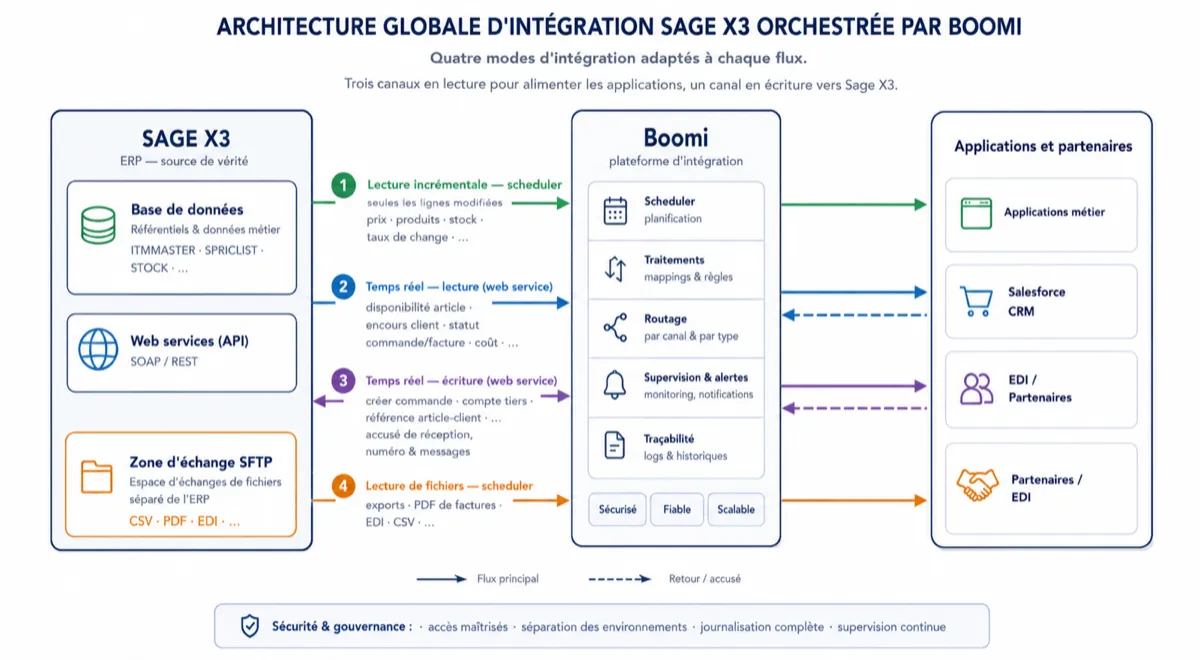
Overall Sage X3 integration architecture orchestrated by Boomi — four modes, each suited to a type of flow.
Smart batch: reading the database incrementally
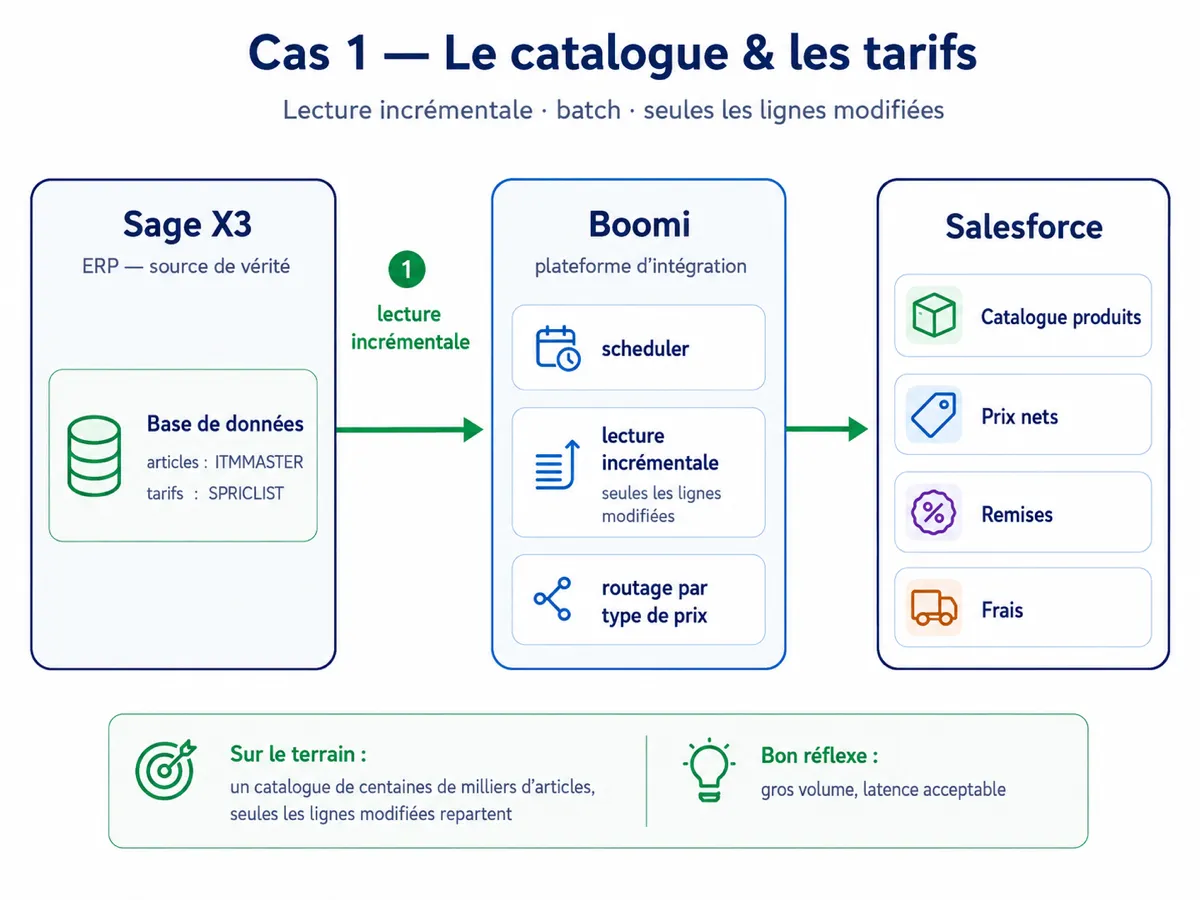
For large master data sets, Boomi reads the Sage X3 database on a schedule. The principle is incremental: on each run, only the lines changed since the last run are re-read.
The clearest example is the item catalogue and price lists. On a master data set of several hundred thousand items, a full run on every cycle would saturate the ERP only to refresh, in the end, the few hundred lines changed during the day. Incremental mode only moves that difference.
Prices add a useful subtlety: a single price list from the ERP is split, by price type — net prices, discounts, charges — into several distinct Salesforce objects. Boomi routes each line to its target, without manual work.
Real time: querying the ERP on the spot
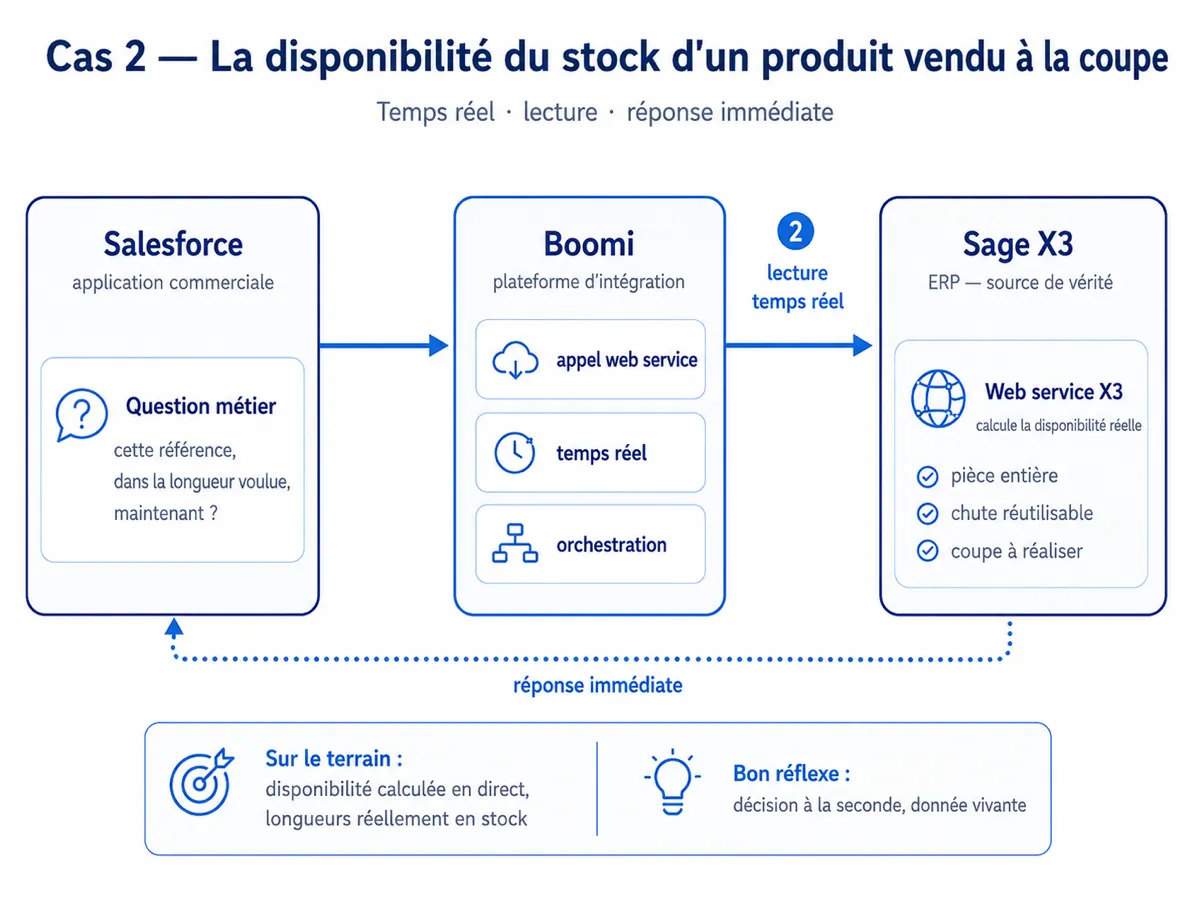
When freshness comes first, Boomi calls a Sage X3 web service and gets an immediate answer. Nothing is stored: the data is read at the exact moment it is needed, in the ERP’s actual state.
The typical example is the availability of a product sold by the length. When a sales rep asks “do I have this item, in the length required, right now?”, the answer cannot come from stock imported the day before. The ERP web service calculates real availability from the lengths actually in stock — full piece, reusable offcut, or cut to be made.
The same logic applies to checking a customer’s outstanding balance before committing to an order, or the status of an order in progress: the information is read at the source, at the moment the decision is made.
Writing without re-keying: feeding Sage X3 through web services
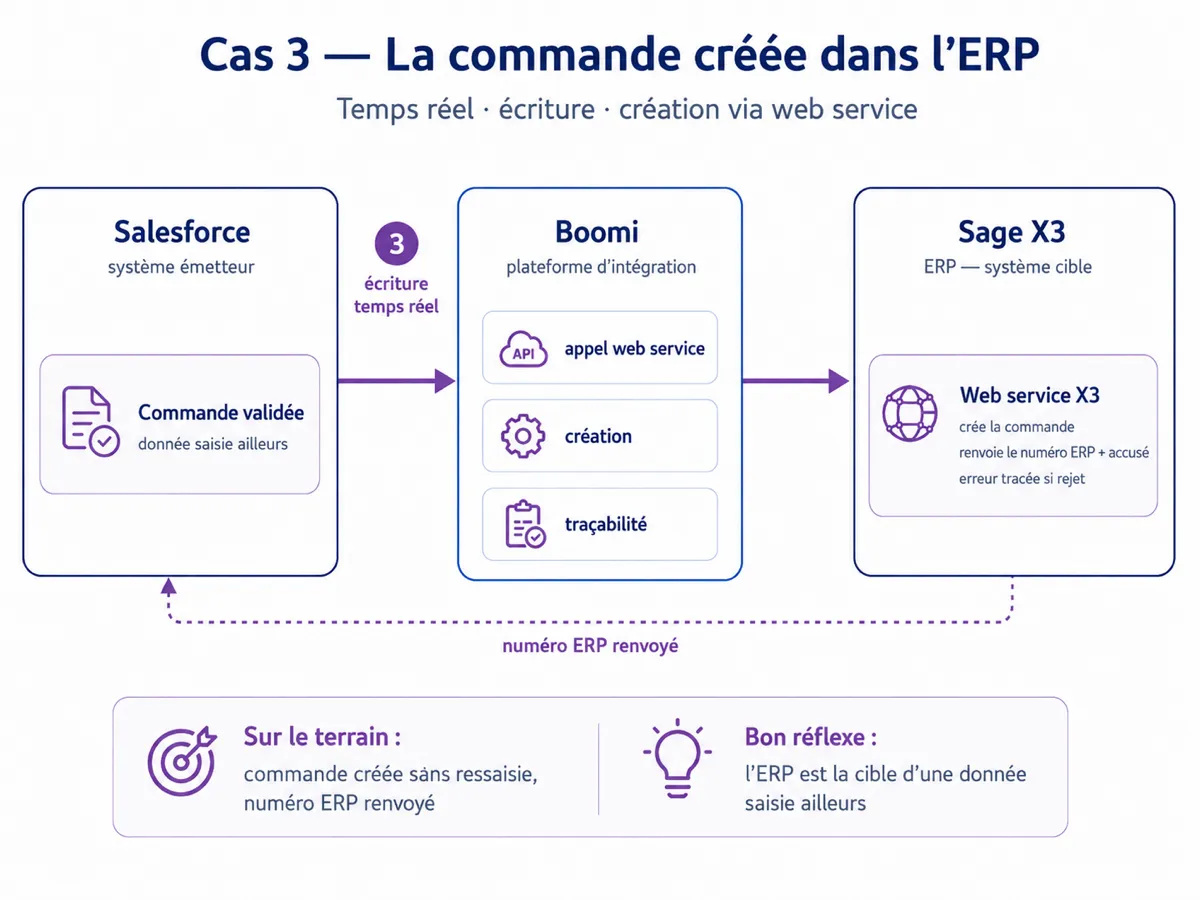
The same channel works the other way: Boomi calls an ERP web service to create or update an object, then retrieves the acknowledgement — generated number, business messages, any errors.
The typical example is the order. Once approved in Salesforce, it is created in the ERP within seconds; the ERP immediately returns its number, which then appears in Salesforce. The sales rep knows the order has gone through, without re-keying anything.
Two details make it robust. The acknowledgement, which records success and brings back the ERP number. And error handling: a rejection — an item that already exists, a business check — is caught and logged, never lost silently. The same channel is used to create a customer account or a customer-item reference.
Files: the channel for batch exchanges
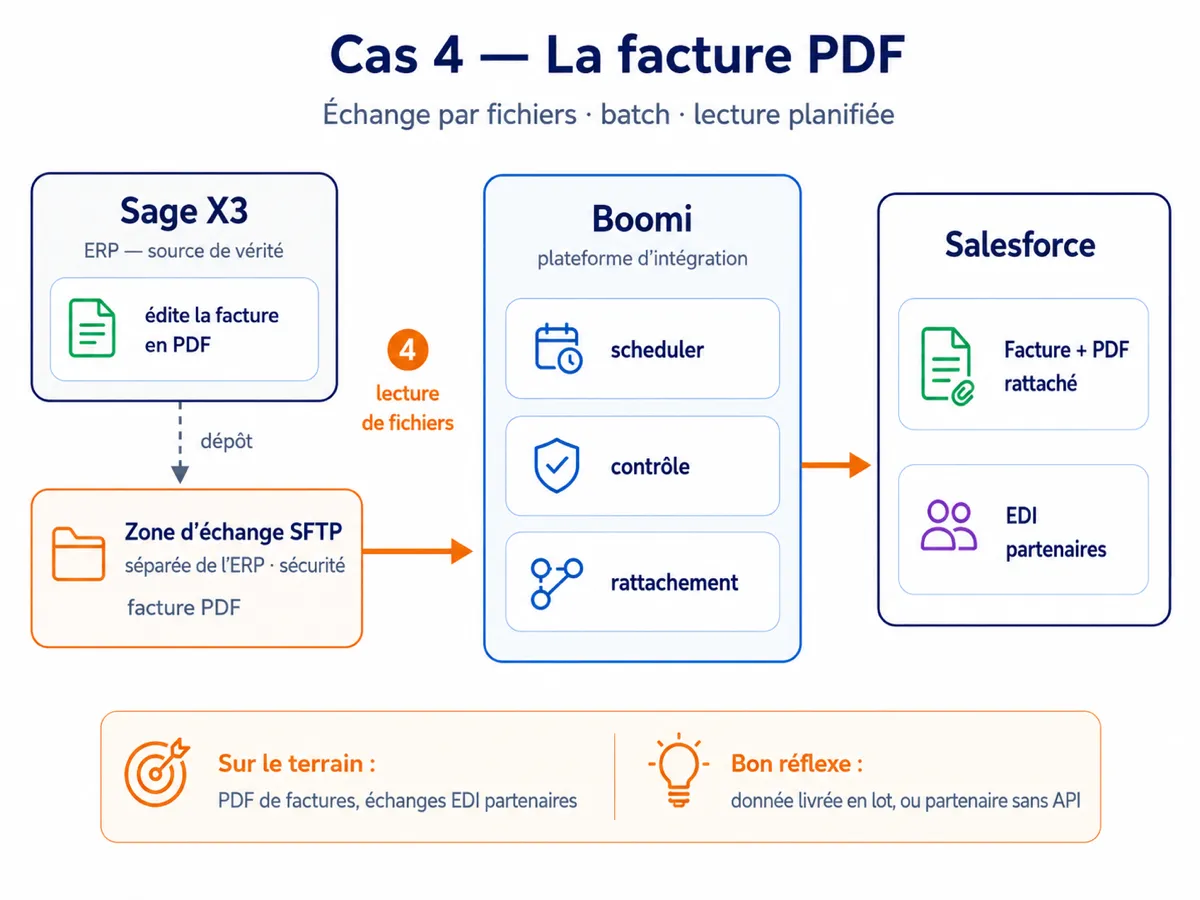
Some data is still delivered in batches: scheduled exports, exchanges with partners, documents. Sage X3 drops them in an SFTP exchange area deliberately kept separate from the ERP — no third-party system accesses Sage X3 directly, and an incident on the exchange side has no effect on production.
The concrete example is the invoice. Generated as a PDF by the ERP, it is dropped in the SFTP area; Boomi picks it up, checks it and automatically attaches it to the matching invoice in Salesforce, where teams can view it. The same channel carries EDI exchanges with partners, many of whom do not expose an API.
“Is it available?”: one need, two channels
A single business object can use two channels. Take the product sold by the length again: to answer “can it be delivered?”, Salesforce queries the ERP in real time, which assesses real availability given the lengths in stock, and the answer comes back within moments.
The same item also flows down, through incremental reads, to feed the Salesforce catalogue and prices. Two opposite freshness requirements, two channels, one tool: it is this combination, chosen case by case, that keeps the whole consistent.
Deciding with three questions
Choosing the channel comes down to three questions: must the data be fresh to the second? What is its volume? Which way does it flow?
| Need | Sage X3 channel | Mode | Strategy |
|---|---|---|---|
| Large master data set, latency acceptable | Database | Scheduler | Incremental read |
| Immediate answer: availability, outstanding balance or status | Web service | Real time | On-demand read |
| Create or update in the ERP | Web service | Real time | Write with acknowledgement |
| Data delivered as a file | SFTP exchange area | Scheduler | Check and transform |
What keeps the integration running in production
Choosing the right channel is not enough; the flow also has to hold over time. Four principles take care of that.
A stable identification key. A unique ERP code per record — the item, the site, or their combination — serves as the upsert key: each update finds its target, without creating duplicates.
Replayable operations. Everything is an upsert: rerunning a flow after an incident neither duplicates nor corrupts data.
End-to-end monitoring. Every run is tracked in a flow monitoring tool; a failure triggers an alert, and a single flow can be replayed without rerunning everything.
Respect for the ERP. Incremental reads, controlled batches (up to 200 records per API call) and an isolated exchange area limit load and exposure: the integration must never degrade Sage X3 in production.
These architecture choices, more than the tool itself, determine final reliability.
Key takeaways
- Sage X3 can be integrated through three ways in — database, web services, file exchange area — for both reading and writing.
- Incremental mode makes batch sustainable at scale: only the difference moves.
- The right channel is chosen flow by flow, based on expected freshness, volume and direction.
Mapping the flows around a Sage X3 and assigning each one the right channel: that is what separates a lasting integration from a pile of scripts.