Blog
Why migrate your ETL flows from Talend to Boomi?
Talend or Boomi? A comparison, migration steps, a Salesforce to Snowflake example and a test protocol for moving your ETL flows to an iPaaS.
7 min read
- Talend
- Boomi
- ETL
- iPaaS
- Migration

Data is now the real fuel of digital transformation.
Whether it comes from CRMs, e-commerce platforms, IoT sensors or mobile applications, flows are multiplying and reaching unprecedented volumes.
Faced with this explosion, companies must meet three major challenges:
- Collecting heterogeneous data from multiple sources,
- Transforming this raw data into usable information,
- Loading and governing this data in target environments such as ERPs, Data Warehouses or Data Lakes.
Historically, this job has relied on robust ETL tools such as Talend, a pioneer of data integration.
But in the age of the cloud and real time, a new generation of iPaaS solutions, embodied by Boomi, is redefining the standards of agility, performance and simplicity.
Talend: a robust but demanding ETL
A job-based model
Talend was long one of the pioneers of open-source ETL. It works by building ETL jobs made of interconnected visual components. A typical flow looks like this:
- tFileInputDelimited → reads a CSV file.
- tMap → transforms and maps the data.
- tJoin → joins with another table.
- tDBOutput → loads into a database.
This model offers great flexibility, but at the cost of a steep learning curve and complexity that grows as flows multiply.
Strengths:
- A very rich connector library, covering relational databases, flat files, REST/SOAP APIs and more.
- Powerful transformation through tMap, for applying filters, expressions, joins and enrichments.
- Its open-source roots, which brought together a large community producing tutorials, forums and best practices.
Limitations:
- The growing complexity of jobs: beyond a few dozen components, flows become hard to maintain.
- A deployment model historically geared to on-premise, involving dedicated servers and manual supervision.
- Centralised orchestration through Talend Admin Center (TAC), which can become a weak point and make management heavier.
- Scattered logs and monitoring tools, less suited to modern cloud environments.
Boomi: the cloud-native iPaaS
A modern approach
Unlike traditional ETL solutions, Boomi takes a fully cloud-native approach. As an iPaaS (Integration Platform as a Service), it removes the burden of servers to maintain and offers an experience designed for speed and simplicity.
Its main assets:
- 100% cloud: no servers to administer, everything is deployed in a SaaS environment.
- Visual Process Builder: drag-and-drop flow design, accessible even to non-developers.
- Atoms: small, lightweight runtime engines that can run in the cloud or on premise, for hybrid flexibility.
- Centralised monitoring: real-time tracking, alerts, logs and reporting straight from the web interface.
Strengths:
- Native SaaS connectors (Salesforce, NetSuite, Workday, etc.), avoiding the need for custom development.
- Unmatched speed of deployment thanks to an intuitive interface and predefined processes.
- Maintenance kept to a strict minimum: automatic updates, built-in supervision.
- Native support for real time and APIs, enabling modern event-driven integrations.
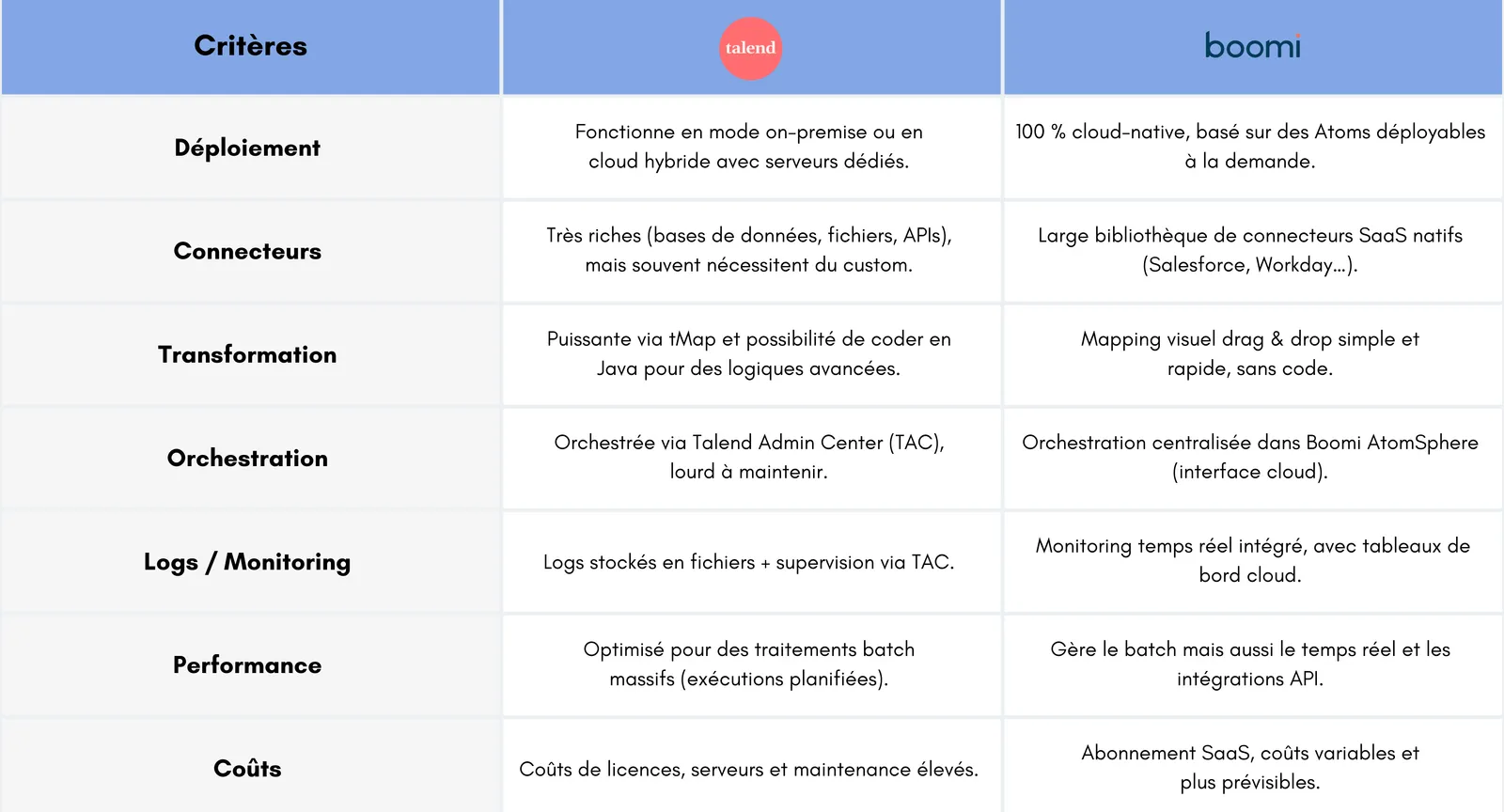
Talend vs Boomi comparison
Steps to a successful migration
Migrating an ETL flow from Talend to Boomi is not a matter of simply “copying and pasting” existing jobs. It is a methodical process that requires careful preparation and good coordination between technical and business teams.
1. Audit
- List all existing Talend jobs (sources, transformations, destinations).
- Identify the connectors in use (databases, APIs, files, SaaS).
- Spot the critical points: complex tMap mappings, Java transformations, jobs scheduled through TAC.
2. Mapping
- Build an overall diagram of the flows: which sources feed which target systems?
- List the functional equivalents: e.g. tSalesforceInput → Boomi Salesforce connector.
- Determine the interdependencies (scheduling, data shared between jobs).
3. Design
- Adapt the logic to the Boomi model: each process is a “workflow” in Process Builder.
- Redefine the transformation rules with the Boomi Mapping tool.
- Plan exception and log handling through AtomSphere monitoring.
4. Build
- Recreate the processes step by step in Boomi Process Builder.
- Configure the source and target connectors.
- Set up the visual mappings.
- Add error-handling steps (e.g. an “Exception” branch).
5. Test
- Compare Talend and Boomi results on identical datasets.
- Check data quality (counts, matching values).
- Measure performance (execution time, CPU/memory usage).
6. Deployment
- Publish the processes to the production environment through Boomi AtomSphere.
- Set up proactive monitoring with alerts and dashboards.
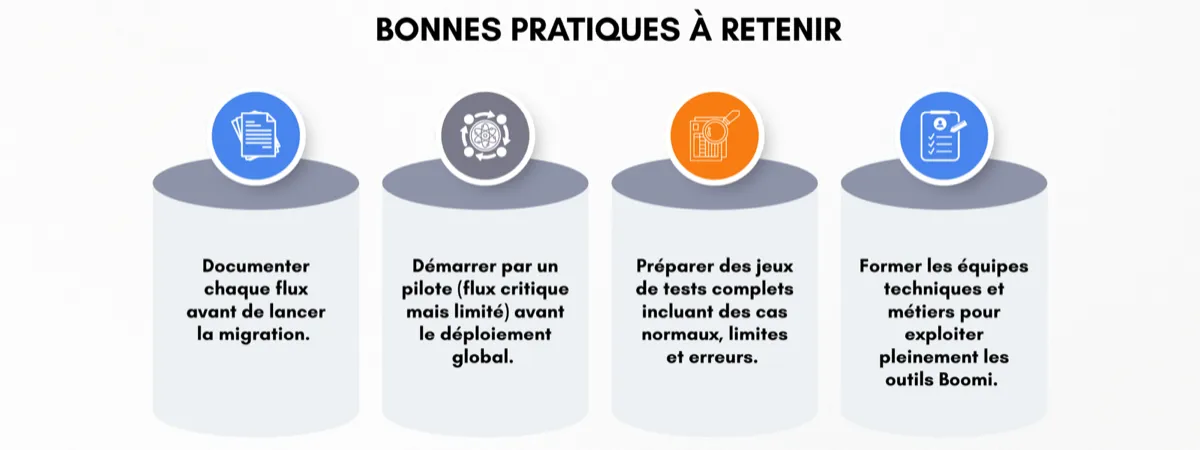
- Train business teams so they can follow the flows on their own.
A concrete example: Salesforce → Data Lake migration
Use case
An international company wants to modernise its Salesforce CRM → Snowflake Data Lake flow.
The goal: consolidate customer data from Salesforce in a cloud warehouse to feed its reporting tools and its artificial intelligence projects.
Implementation with Talend
In Talend, the flow relies on a sequence of components:
- tSalesforceInput: extracts Salesforce objects (Accounts, Contacts, Opportunities).
- tMap: transforms the data, for example:
-
normalising names and addresses.
-
enriching with internal reference data.
-
handling null values.
-
- tDBOutput: loads into Snowflake through a JDBC connector.
Points to note:
- The transformation may require custom Java code, especially for complex rules.
- Monitoring relies on logs stored locally and centralised through Talend Admin Center (TAC).
- Each deployment requires manual scheduling on the ETL servers.
Implementation with Boomi
With Boomi, the flow is rebuilt in Process Builder:
- Native Salesforce connector: extracts objects directly from the Salesforce API, with no specific driver.
- Boomi Map: transformation through a visual drag & drop interface, including:
-
field-to-field mapping.
-
standard transformation functions (concatenation, split, normalisation).
-
business rules handled through predefined profiles.
-
- Snowflake connector: direct loading through a native connector, with built-in monitoring.
Points to note:
- The transformation logic is simpler thanks to ready-to-use functions.
- Logs and errors are automatically centralised in the AtomSphere interface.
- Deployment needs no ETL server: a cloud-hosted Atom runs the process.
What Boomi changes:
- Centralised monitoring: no more cross-checking logs and TAC, all the information is visible in AtomSphere.
- Simpler deployment: no servers to maintain, updates happen automatically.
- Greater agility: new Salesforce sources (e.g. marketing campaigns) added in a few clicks.
Testing and validation
An ETL flow migration can only be considered successful after a rigorous testing phase. It ensures data quality, measures performance and validates the functional fit with business needs.
Main objectives
- Check data integrity: all data processed by Boomi must match the data produced by Talend.
- Compare performance: analyse processing time, memory/CPU usage and scalability.
- Obtain business sign-off: involve end users to make sure the results are usable and reliable.
Example test protocol
1. Define a reference dataset
- Extract 100,000 Salesforce records (accounts, contacts, opportunities).
- This data will serve as the basis for comparing Talend and Boomi.
2. Run the flow in Talend
- Process the 100,000 rows with the existing job (tSalesforceInput → tMap → tDBOutput).
- Export the results to a validation table (Snowflake).
3. Recreate the same flow in Boomi
- Build the equivalent process (Salesforce connector → Boomi Map → Snowflake connector).
- Run it on the same dataset.
4. Compare the results
- Quantitative: number of rows processed (must be identical).
- Qualitative: field-by-field check (e.g. Nom_Client, Email, Date_Création).
- Performance: comparison of the execution time of the same flow, on the same volume, in Talend and in Boomi.
5. Business validation
Business teams (e.g. Marketing and CRM) check that the data returned meets expectations (normalised names, valid emails, duplicates removed).
Pitfalls to avoid
- Forgetting the logs: without traceability, it is impossible to diagnose an anomaly.
- Ignoring complex mappings: some specific Java processing must be redefined in Boomi.
- Neglecting training: untrained users may misread the results or make poor use of the tool.
Lessons learned
Successful ETL migrations rarely rely on a massive, immediate switchover.
They usually go through a pilot phase, testing the method on a critical but limited flow before gradually extending it to the whole scope.
One of the main challenges lies in the differences in mapping logic: some transformations coded in Java in Talend need a functional redesign to take advantage of the visual model of Boomi.
In the end, companies that make the move see significant gains: shorter development times, better visibility over flows and, above all, greater agility to respond to fast-changing business needs.
Conclusion
Migrating from Talend to Boomi is much more than a change of tool: it means adopting a new way of approaching data integration.
The concrete benefits:
- Lower costs by removing heavy servers and lightening maintenance.
- Faster projects with quicker deployment of flows.
- Modernised architectures with a resolutely cloud-first approach.
Data integration is moving towards hybrid approaches, combining batch processing, real time, APIs and stronger governance.
In this changing landscape, Boomi is establishing itself as a key player, able to combine agility, simplicity and performance for tomorrow’s ETL flows.